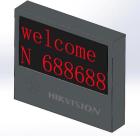
2-Lines 4-Characters Dark-Grey Outdoor Entrance & Exit LED Screen

  • Placed in the entrance of the parking lot, displaying the information of welcome, advertising and news, etc.
  • Displaying standard Chinese characters and numeric characters, and its standard communication method is RJ45, both online and offline are supported
  • Displaying content can be the remaining parking spaces of the whole parking lot, license plate number, charge and weather forecast, etc.
  • Displaying different content according to the instruction from the host computer
  • ar subtitle
View Less
View more

Modèles disponibles:

DS-TVL224-4-5Y(2 Rows)

Specification

  • Installation
  • Maintenance ModeFront
  • Display Screen
  • Pixel PitchP4.75
  • Resolution64*32
  • Display ContentGB2312 Character Set,16*16 Lattice Chinese Characters
  • Screen TypeLED
  • Display ColorRed,Green,Yellow
  • Number of Module1
  • Viewing Angle120° (H) / 120° (V)
  • Display Modeinstant,left shift,up forward,etc.
  • Pixel Pitch Category4.75
  • Color Temperature3000k to 6000k
  • Brightness Uniformity≥95%
  • Color Uniformity≥95%
  • Contrast Ratio2000 : 1
  • Luminance1500cd/m²
  • Scanning Mode8S
  • Communication ModeTCP
  • Approval
  • ProtectionIP54
  • General
  • Screen Border MaterialIron Frame Spraying Plastic(Dark armored glass for display part)
  • Working Temperature and Humidity-30 to 60 °C 10% to 85% RH
  • AlimentationAC110-240V,50/60Hz,max0.5A
  • Package Dimensions475mm*430mm*185mm
  • Dimensions355 × 315 × 80 mm (13.98 × 12.4 × 3.15 inch)
  • 5.3 kg (11.68 lb.)
  • Weight (with Package)6.4 kg (14.11 lb.)
  • Storage Temperature and Humidity-40 to 70 °C 10% to 85% RH
  • Average Consumption10W
  • Max. Consumption30W
  • Lifespan100000Hours

Specification

Specification
Installation
  • Installation
Display Screen
  • Display Screen
  • Display Screen
  • Display Screen
  • Display Screen
  • Display Screen
  • Display Screen
  • Display Screen
  • Display Screen
  • Display Screen
  • Display Screen
  • Display Screen
  • Display Screen
  • Display Screen
  • Display Screen
  • Display Screen
  • Display Screen
Approval
  • Approval
General
  • General
  • General
  • General
  • General
  • General
  • General
  • General
  • General
  • General
  • General
  • General

Ressources

Documents techniques

Hikvision.com utilise des cookies et des technologies associées strictement nécessaires pour permettre au site Web de fonctionner, notamment pour vous authentifier / sécuriser notre service / enregistrer certaines préférences / enregistrer vos préférences en matière de cookies.

Avec votre consentement, nous aimerions également utiliser des cookies pour observer et analyser les niveaux de trafic et d'autres mesures / vous montrer des publicités ciblées / vous montrer des publicités en fonction de votre localisation. Vous pouvez toujours vous opposer et modifier l'utilisation de ces cookies en utilisant le bouton Gérer les cookies sur le site Web.

Pour plus d'informations sur les pratiques en matière de cookies, veuillez consulter notre politique relative aux cookies.

Contacts
Contactez-Nous
Hik-Partner Pro close
Hik-Partner Pro
Security Business Assistant. At Your Fingertips. Learn more
Hik-Partner Pro
Scan and download the app
Hik-Partner Pro
Hik-Partner Pro

Get a better browsing experience

You are using a web browser we don’t support. Please try one of the following options to have a better experience of our web content.